
Operations basics

Use cases

The use cases modeled here describe the interactions between aitflow and the PDS crawler to perform various tasks related to ingestion, extraction, transformation, and report generation for PDS data collections.

The use cases identify user goals and the tasks they must perform to achieve those goals, providing a comprehensive overview of the PDS crawler’s requirements.
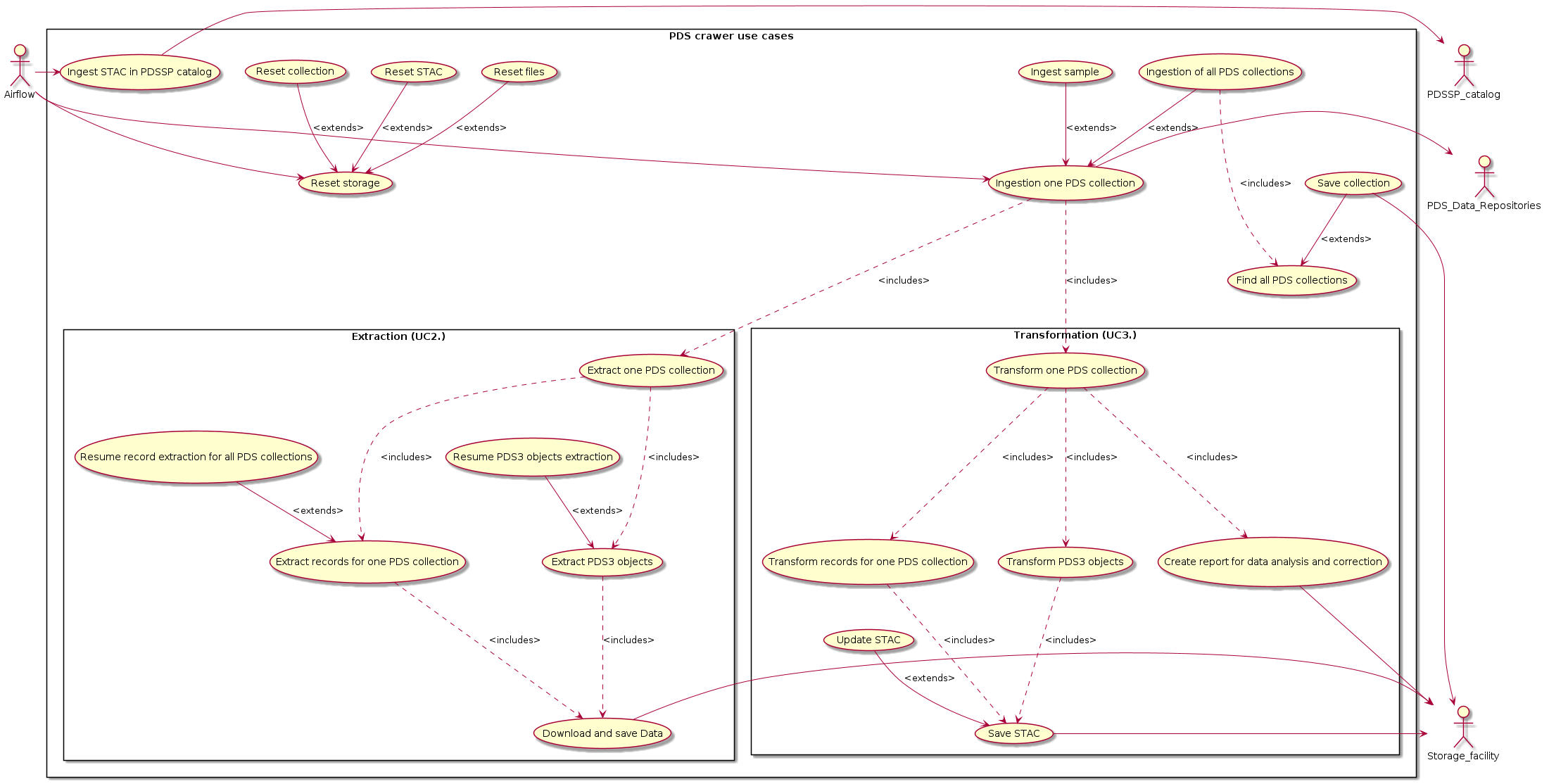
rectangle "PDS crawer use cases" {

(Ingestion of all PDS collections) as (UC1)
(Find all PDS collections) as (UC1_1)
(Save collection) as (UC1_2)
(Ingestion one PDS collection) as (UC1_3)
(Ingest sample) as (UC1_4)
(Ingest STAC in PDSSP catalog) as (UC4)
(Reset storage) as (UC5)
(Reset files) as (UC5_1)
(Reset STAC) as (UC5_2)
(Reset collection) as (UC5_3)

  rectangle "Extraction (UC2.)" {
    (Extract one PDS collection) as (UC2)

    (Extract records for one PDS collection) as (UC2_1)
    (Extract PDS3 objects) as (UC2_2)

    (Resume record extraction for all PDS collections) as (UC2_3)
    (Resume PDS3 objects extraction) as (UC2_4)

    (Download and save Data) as (UC2_5)

    UC2 -.-> UC2_1: <includes>
    UC2 -.-> UC2_2: <includes>
    UC2_3 --> UC2_1: <extends>
    UC2_4 --> UC2_2: <extends>
    UC2_1 -.-> UC2_5: <includes>
    UC2_2 -.-> UC2_5: <includes>

  }

  rectangle "Transformation (UC3.)" {

    (Transform one PDS collection) as (UC3)
    (Transform records for one PDS collection) as (UC3_1)
    (Transform PDS3 objects) as (UC3_2)
    (Create report for data analysis and correction) as (UC3_3)
    (Save STAC) as (UC3_4)
    (Update STAC) as (UC3_5)
    UC3 -.-> UC3_1: <includes>
    UC3 -.-> UC3_2: <includes>
    UC3 -.-> UC3_3: <includes>
    UC3_1 -.-> UC3_4: <includes>
    UC3_2 -.-> UC3_4: <includes>
    UC3_5 --> UC3_4: <extends>

  }

UC1 --> UC1_3: <extends>
UC1 -.-> UC1_1 : <includes>
UC1_2 --> UC1_1: <extends>
UC1_4 --> UC1_3: <extends>
UC1_3 -.-> UC2 : <includes>
UC1_3 -.-> UC3 : <includes>
UC5_1 --> UC5: <extends>
UC5_2 --> UC5: <extends>
UC5_3 --> UC5: <extends>

}

Airflow -> UC1_3
Airflow -> UC4
Airflow -> UC5

UC1_2 -> Storage_facility
UC2_5 -> Storage_facility
UC3_3 -> Storage_facility
UC3_4 -> Storage_facility
UC4 -> PDSSP_catalog
UC1_3 -> PDS_Data_Repositories

The following sections describe the main functions.

Main use case : UC 1 - Ingestion of one PDS collection

Use case : Ingestion of one PDS collection

Use case Title

Ingestion of one PDS Collection

Description

This use case addresses the need to ingest one PDS (Planetary Data System) collection into a system for further processing and analysis.

Actors

PDS crawler, PDS Data Repositories

Preconditions

  • The PDS crawler is running and connected to the internet.

  • The PDS Data Repositories are accessible and contain the relevant collections.

  • The PDS crawler has sufficient storage capacity to store the ingested data.

Steps

  • 1 - Extract one collection: The PDS crawler downloads the identified collections from the PDS Data Repositories.

  • 2 - Store extracted data: The extracted data are stored in the PDS crawler’s storage for further analysis.

Postconditions

  • The collection has been ingested into the PDS crawler.

  • The ingested data is available in the PDS crawler’s storage.

Alternate Flows

If a records cannot be downloaded or processed, an error message is generated and the system moves on to the next available collection.

Exception Flows

  • If the PDS crawler encounters an error during the ingestion process, it generates an error message and attempts to recover or retry the process.

  • If the PDS Data Repositories is inaccessible or unavailable, the Data Ingestion System generates an error message and waits for the repositories to become available again.

Notes

The transformation process may involve several sub-steps, such as data cleaning, normalization, and feature engineering, depending on the specific requirements of the analysis.

Sub use case : UC 1.1 - Ingestion of all PDS collections

Use case : Ingestion of one PDS collection

Use case Title

Ingestion of all PDS Collections

Description

This use case is an extension of UC 1 - Ingestion of one PDS collection. This use case addresses the need to ingest all PDS (Planetary Data System) collections into a system for further processing and analysis.

Actors

PDS crawler, PDS Data Repositories

Preconditions

  • The PDS crawler is running and connected to the internet.

  • The PDS Data Repositories are accessible and contain the relevant collections.

  • The PDS crawler has sufficient storage capacity to store the ingested data.

Steps

  • 1 - Find all PDS collections: The PDS crawler queries the PDS Data Repositories to identify all available collections.

  • 2 - Extract all collections: The PDS crawler downloads the identified collections from the PDS Data Repositories.

  • 3 - Store ingested data: The extracted data are stored in the PDS crawler’s storage for further analysis.

Postconditions

  • All PDS collections have been ingested into the PDS crawler.

  • The ingested data is available in the PDS crawler’s storage.

Alternate Flows

If a collection cannot be downloaded or processed, an error message is generated and the system moves on to the next available collection.

Exception Flows

  • If the PDS crawler encounters an error during the ingestion process, it generates an error message and attempts to recover or retry the process.

  • If the PDS Data Repositories are inaccessible or unavailable, the Data Ingestion System generates an error message and waits for the repositories to become available again.

Notes

The transformation process may involve several sub-steps, such as data cleaning, normalization, and feature engineering, depending on the specific requirements of the analysis.

Sub use case : UC 1.2 - Find all PDS collections

Use case : Find all PDS collections

Use case Title

Find all PDS collections

Description

This use case addresses the need to find all georeferenced PDS (Planetary Data System) collections for further downloading.

Actors

PDS crawler, ODE web service

Preconditions

  • The PDS crawler is running and connected to the internet.

  • The ODE web service is accessible.

Steps

  • 1 - Request all PDS collections: The PDS crawler queries https://oderest.rsl.wustl.edu/live2/?query=iipt&output=json to get all georeferenced collections. The iipt option allows a user to get a list of instrument hosts/instrument/product type sets

  • 2 - Parse the response: The response is parsed. The response is specified in Link Table11 https://oderest.rsl.wustl.edu/ODE_REST_V2.1.pdf

  • 3 - Filter the response : Only collections having ValidFootprints != ‘F’ and NumberProducts != 0 are selected to get georeferenced records

  • 4 - Store the response in an object: the response is stored to be easily processed in for further storing

  • 4 - Store the object in a HDF5 for persistence: The object is stored in a HDF5 node for further processing.

Postconditions

  • All PDS collections have been ingested into a HDF5 file.

  • The ingested data is available in the PDS crawler’s storage.

Alternate Flows

If a collection cannot be processed, an error message is generated and the system moves on to the next available collection.

Exception Flows

  • If a collection is not goreferenced, the PDS crawler generates an warning message and the system moves on to the next available collection.

  • If an attribute of the collection is missing, the PDS crawle generates an error message and stores it in a report and the system moves on to the next available collection.

  • If the ODE web service is inaccessible or unavailable, the PDS crawler generates an error message and waits for the repositories to become available again.

Notes

User manual of ODE web service : https://oderest.rsl.wustl.edu/ODE_REST_V2.1.pdf

Sub use case : UC 1.3 - Ingest sample

Use case : Ingest sample

Use case Title

Ingest sample

Description

This use case is an extension of UC 1 - Ingestion of one PDS collection. This use case addresses the need to retrieve a subset of the collection.

Actors

PDS crawler, PDS Data Repositories

Preconditions

  • The PDS crawler is running and connected to the internet.

  • The PDS Data Repositories are accessible and contain the relevant collections.

  • The PDS crawler has sufficient storage capacity to store the ingested data.

Steps

  • 1 - Define the number of pages to retrieve per collection

  • 2 - Extract one collection: The PDS crawler downloads the identified collections from the PDS Data Repositories.

  • 3 - Store extracted data: The extracted data are stored in the PDS crawler’s storage for further analysis.

Postconditions

  • The collection has been ingested into the PDS crawler.

  • The ingested data is available in the PDS crawler’s storage.

Alternate Flows

If a records cannot be downloaded or processed, an error message is generated and the system moves on to the next available collection.

Exception Flows

  • If the PDS crawler encounters an error during the ingestion process, it generates an error message and attempts to recover or retry the process.

  • If the PDS Data Repositories is inaccessible or unavailable, the Data Ingestion System generates an error message and waits for the repositories to become available again.

Notes

The transformation process may involve several sub-steps, such as data cleaning, normalization, and feature engineering, depending on the specific requirements of the analysis.

Sub use case : UC 1.4 - Save collection

Use case : Save collection

Use case Title

Save collection

Description

This use case is an extension of UC 1.2 - Find all PDS collections. This use case addresses the need to save the current collection in the PDS crawler storage in order to be able to search for it and process it completely in case of an error.

Actors

PDS crawler

Preconditions

The PDS crawler has sufficient storage capacity to store the ingested data.

Steps

  • 1 - Check if the collection had already saved

  • 2 - Save the collection in the HDF5 file

Postconditions

The collection is available in the HDF5 file of the PDS crawler’s storage.

Alternate Flows

If the collection has already saved, the collection is not saved.

Exception Flows

  • TODO : If the PDS crawler encounters an error during the ingestion process, it generates an error message and attempts to recover or retry the process.

  • TOD : If the PDS Data Repositories is inaccessible or unavailable, the Data Ingestion System generates an error message and waits for the repositories to become available again.

Main use case : UC 2 - Extraction of one collection

Use case : Extraction of one collection

Use case Title

Extraction of one collection

Description

This use case addresses the need to extract PDS information from the PDS Data Repositories.

Actors

PDS crawler, PDS Data Repositories

Preconditions

  • The PDS crawler is running and connected to the internet.

  • The PDS Data Repositories are accessible and contain the relevant collections.

  • The PDS crawler has sufficient storage capacity to store the ingested data.

Steps

  • 1 - Extract records from the PDS collection

  • 2 - Download the records from the PDS collection

  • 3 - Extract the PDS3 objects from the PDS collection

  • 4 - Download the PDS3 objects from the PDS collection

Postconditions

  • The PDS collection has been ingested into the PDS crawler.

  • The ingested data is available in the PDS crawler’s storage.

Alternate Flows

If the collection cannot be downloaded or processed, an error message is generated and the system continues.

Exception Flows

  • TODO : If the PDS crawler encounters an error during the ingestion process, it generates an error message and attempts to recover or retry the process.

  • TODO : If the PDS Data Repositories is inaccessible or unavailable, the Data Ingestion System generates an error message and waits for the repositories to become available again.

Sub use case : UC 2.1 - Extract records for one PDS collection

Use case : Extract records for one PDS collection

Use case Title

Extract records for one PDS collection

Description

This use case addresses the need to extract the georeferenced records from the PDS (Planetary Data System) collection for further transforming them to STAC format.

Actors

PDS crawler, ODE web service

Preconditions

  • The PDS crawler is running and connected to the internet.

  • The ODE web service is accessible.

  • The collection to query has been retrieved by the Find all PDS collections use case

Steps

  • Get the PDS collection : Retrieve the PDS collection from the cache

  • Generate all Urls: Builds the URLs corresponding to the different pages to get the whole collection.

  • Massive download of URLs content: The PDS crawler downloads the URLs contain from the ODE web service.

  • Store the download: The PDS crawler stores the contain on the filesystem with a structure based on mission/plateform/instrument/dataset

Postconditions

  • The downloaded data is available in the PDS crawler’s storage in the data struture mission/plateform/instrument/dataset

Alternate Flows

If the ODE web service is inaccessible or unavailable, the PDS crawler generates an error message and waits for the repositories to become available again.

Exception Flows

After a number of unsuccessful configurable attempts, the PDS crawler generates an error message and the PDS crawler moves on to the next available collection.

Notes

  • The downloaded data can contain not expected information due to problems on the ODE web service (e.g HTML response instead of JSON response)

Sub use case : UC 2.2 - Extract PDS3 objects

Use case : Extract PDS3 objects

Use case Title

Extract PDS3 objects

Description

PDS3 catalog objects contain information about the mission, the plateform, the instrument and the dataset. These information are more detailed that those provided by the ODE web service. These objets are available on the the PDS dataset browser.

Actors

PDS crawler, PDS dataset browser

Preconditions

  • The PDS crawler is running and connected to the internet.

  • The PDS dataset browser is accessible.

  • The records of the collections provided by the Extract records for all PDS collection are stored on the PDS crawler’s storage

  • The collections to query have been retrieved by the Find all PDS collections use case

Steps

  • Get the PDS collections : Retrieve the PDS collections from cache

  • Get the necessary information for each collection : Get mission, plateform, instrument, dataset attributes

  • Get the first record for the collection: Retrieve the record for the collection from the cache

  • Get the necessary information from the record : Get pds_volume from the record

  • Request PDS dataset browser: Build the request based on parameters mission, plateformn instrument, dataset and performs the request

  • Extract the URLs of the PDS3 catalog objects: Parse the HTML page and extract the link for each PDS3 object catalog.

  • Download the PDS3 catalog objects: Download the identified URLs and store them in the PDS crawler’s storage

Postconditions

  • The downloaded data is available in the PDS crawler’s storage in the data struture mission/plateform/instrument/dataset

Alternate Flows

If the ODE web service is inaccessible or unavailable, the PDS crawler generates an error message and waits for the repositories to become available again.

Exception Flows

After a number of unsuccessful configurable attempts, the PDS crawler generates an error message and the PDS crawler moves on to the next available collection.

Notes

Sub use case : UC 2.3 - Resume record extraction for all PDS collections

Use case : Resume record extraction for one PDS collection

Use case Title

Resume record extraction for all PDS collections

Description

This use case addresses the need to fully or partially reprocess all unprocessed downloaded responses from the ODE web service.

Actors

PDS crawler, ODE web service

Preconditions

  • The PDS crawler is running and connected to the internet.

  • The ODE web service is accessible.

  • The collection to query has been retrieved by the Find all PDS collections use case

  • The result of the previous Extract records for one PDS collection is stored

Steps

  • Get the PDS collection: Retrieve the PDS collection from cache

  • Get all URLs from cache: Retrieve all URLs

  • Massive download of URLs content: The PDS crawler downloads URLs that are not available in the cache

  • Store the download: The PDS crawler stores the contain on the filesystem with a structure based on mission/plateform/instrument/dataset

Postconditions

  • The downloaded data is available in the PDS crawler’s storage in the data struture mission/plateform/instrument/dataset

Alternate Flows

If the ODE web service is inaccessible or unavailable, the PDS crawler generates an error message and waits for the repositories to become available again.

Exception Flows

After a number of unsuccessful configurable attempts, the PDS crawler generates an error message and the PDS crawler moves on to the next available collection.

Notes

  • The downloaded data can contain not expected information due to problems on the ODE web service (e.g HTML response instead of JSON response)

Sub use case : UC 2.4 - Resume PDS3 objects extraction

Use case : Resume PDS3 objects extraction

Use case Title

Resume PDS3 objects extraction

Description

This use case addresses the need to fully or partially reprocess all unprocessed PDS3 objects in the collection

Actors

PDS crawler, PDS dataset browser

Preconditions

  • The PDS crawler is running and connected to the internet.

  • The PDS dataset browser is accessible.

  • The records of the collection provided by the Extract PDS3 objects are stored on the PDS crawler’s storage

  • The collection to query has been retrieved by the Find all PDS collections use case and stored in the PDS crawler’s storage

Steps

  • Get the PDS collection : Retrieve the PDS collection from cache

  • Get the necessary information for each collection : Get mission, plateform, instrument, dataset attributes

  • Get one record for each collection: Retrieve one record per collection from the cache

  • Get the necessary information from the record : Get pds_volume from the record

  • Request PDS dataset browser: Build the request based on parameters mission, plateformn instrument, dataset and performs the request

  • Extract the URLs of the PDS3 catalog objects: Parse the HTML page and extract the link for each PDS3 object catalog.

  • Download the PDS3 catalog objects: Download the identified URLs, not already downloaded and store them in the PDS crawler’s storage

Postconditions

  • The downloaded data is available in the PDS crawler’s storage in the data struture mission/plateform/instrument/dataset

Alternate Flows

If the ODE web service is inaccessible or unavailable, the PDS crawler generates an error message and waits for the repositories to become available again.

Exception Flows

After a number of unsuccessful configurable attempts, the PDS crawler generates an error message and the PDS crawler moves on to the next available collection.

Notes

Main use case : UC 3 - Transformation

Use case : Transformation

Use case Title

Transformation of one PDS Collection

Description

This use case addresses the need to transform the extracted collection in a STAC format.

Actors

PDS crawler

Preconditions

The extracted data is available in the PDS crawler’s storage.

Steps

  • 1 - Find the PDS collection: The PDS crawler queries the cache of the PDS crawler’s storage to get the collection.

  • 2 - Load PDS3 object catalogs: The PDS crawler loads the PDS3 objet catalogs as objects.

  • 3 - Convert PDS3 object catalogs to STAC: The PDS3 objects catalogs are converted to STAC such as PDS root, mission, plateform, instrument, collection

  • 4 - Load the downloaded JSON responses from ODE web service as object.

  • 5 - Convert ODE objects to STAC such as : items, collection (if not available as PDS3 object), instrument (if not available as PDS3 object), plateform (if not available as PDS3 object), mission (if not available as PDS3 object)

  • 6 - Store the STAC object in the PDS crawler’s storage

Postconditions

For each collection, a mission catalog, a plateform catalog, a instrument catalog, a collection and items are available on the PDS crawler’s storage.

Alternate Flows

If an error occurs when a collection is being processed, an error message is generated, notified, and the system moves on to the next available collection.

Exception Flows

None

Notes

STAC specifications : https://github.com/radiantearth/stac-spec/

Sub use case : UC 3.1 - Transform PDS3 objects from the collection

Use case : Transform PDS3 objects from the collection

Use case Title

Transform PDS3 objects from the collection

Description

PDS3 objects contain a wealth of information about the mission, platform, instrument and collection. This use case addresses the need to transform these information in a STAC format.

Actors

PDS crawler

Preconditions

The extracted data is available in the PDS crawler’s storage.

Steps

  • 1 - Find the PDS collection: The PDS crawler queries the cache of the PDS crawler’s storage to get the collection.

  • 2 - Load PDS3 object catalogs: The PDS crawler loads the PDS3 objet catalogs as objects.

  • 3 - Convert PDS3 object catalogs to STAC: The PDS3 objects catalogs are converted to STAC such as PDS root, mission, plateform, instrument, collection

  • 4 - Store the STAC object in the PDS crawler’s storage

Postconditions

a mission catalog, a plateform catalog, a instrument catalog and a collection are available on the PDS crawler’s storage.

Alternate Flows

If an error occurs while processing the collection, it is possible that no catalog is generated. If a catalog is missing, the system will notify the error

Exception Flows

None

Notes

STAC specifications : https://github.com/radiantearth/stac-spec/

Sub use case : UC 3.2 - Transform records from one PDS collection

Use case : Transform records from one PDS collection

Use case Title

Transform records from one PDS collection

Description

This use case addresses the need to transform the extracted collection in a STAC format.

Actors

PDS crawler

Preconditions

The extracted data is available in the PDS crawler’s storage.

Steps

  • 1 - Find the PDS collection: The PDS crawler queries the cache of the PDS crawler’s storage to get the collection.

  • 2 - Load the downloaded JSON responses from ODE web service as object.

  • 3 - Convert ODE objects to STAC such as : items, collection (if not available as PDS3 object), instrument (if not available as PDS3 object), plateform (if not available as PDS3 object), mission (if not available as PDS3 object)

  • 4 - Store the STAC object in the PDS crawler’s storage

Postconditions

items must be generated et enventualy the instrument, plateform, mission as well if these catalogs are not available.

Alternate Flows

If an error occurs when a collection is being processed, an error message is generated, notified, and the system continues

Exception Flows

None

Notes

STAC specifications : https://github.com/radiantearth/stac-spec/

Operations

The main operations of the PDSSP crawler are the following
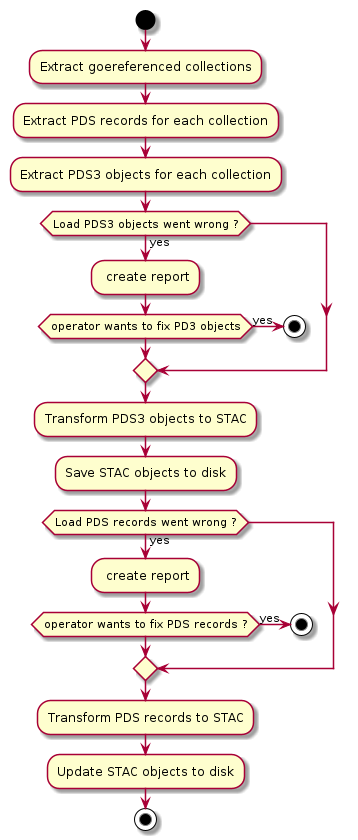
start
:Extract goereferenced collections;
:Extract PDS records for each collection;
:Extract PDS3 objects for each collection;
if (Load PDS3 objects went wrong ?) then (yes)
  : create report;
  if (operator wants to fix PD3 objects) then (yes)
    stop
  endif
endif
:Transform PDS3 objects to STAC;
:Save STAC objects to disk;
if (Load PDS records went wrong ?) then (yes)
  : create report;
  if (operator wants to fix PDS records ?) then (yes)
    stop
  endif
endif
:Transform PDS records to STAC;
:Update STAC objects to disk;
stop

After fixing the PDS3 Objects, the operations are the following
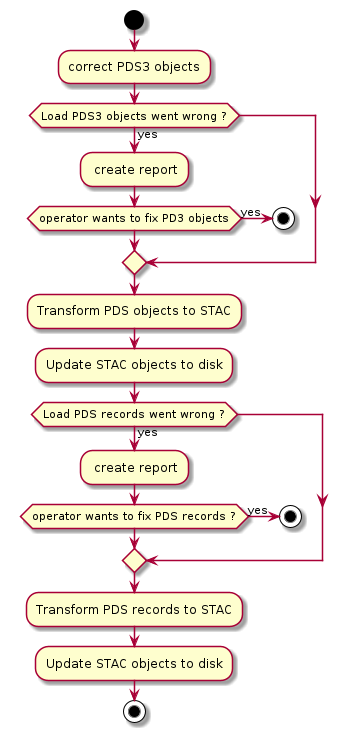
start
:correct PDS3 objects;
if (Load PDS3 objects went wrong ?) then (yes)
  : create report;
  if (operator wants to fix PD3 objects) then (yes)
    stop
  endif
endif
:Transform PDS objects to STAC;
:Update STAC objects to disk;
if (Load PDS records went wrong ?) then (yes)
  : create report;
  if (operator wants to fix PDS records ?) then (yes)
    stop
  endif
endif
:Transform PDS records to STAC;
:Update STAC objects to disk;
stop

if there was a problem loading the PDS records, this indicates that the extraction of the PDS records went wrong. The operations are therefore as follows
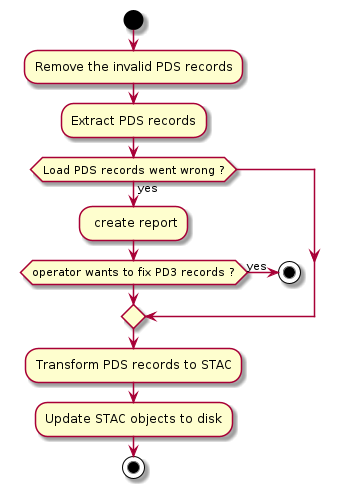
start
:Remove the invalid PDS records;
:Extract PDS records;
if (Load PDS records went wrong ?) then (yes)
  : create report;
  if (operator wants to fix PD3 records ?) then (yes)
    stop
  endif
endif
:Transform PDS records to STAC;
:Update STAC objects to disk;
stop