The pyadql AST: a guided tour
This document explains what the AST means, not just what fields each
class has (that part is in the docstrings inside ast_nodes.py, one per
class). Read this once before working with the AST for the first time;
use the reference table below as a lookup afterwards.
1. The big picture: how to read the shape
parse_adql(query) always returns a SelectExpression. It is a thin
wrapper, not the query itself:
SelectExpression
├── body          -- the actual result-producing part: a Query, or a SetOperation
├── order_by      -- applies to the WHOLE combined result (ADQL 2.1)
├── offset        -- ditto
└── with_clause   -- WITH ... AS (...) common table expressions (ADQL 2.1)
This is not an arbitrary design choice: it mirrors a real ADQL 2.1 change.
ORDER BY / OFFSET apply once, to the combined result of any
UNION/EXCEPT/INTERSECT, never to an individual unparenthesized
SELECT. So for the extremely common case of "just one plain SELECT, no
set operations", you'll write tree.body.where, tree.body.select_list,
etc. for the query's own clauses, and tree.order_by, tree.offset for
the two clauses that sit one level up.
tree.body is one of:
- Query -- an ordinary SELECT ... FROM ... WHERE ... GROUP BY ... HAVING ...
- SetOperation -- the result of UNION/EXCEPT/INTERSECT, whose
own left/right are each again a Query, a SetOperation (chained
set ops), or a SelectExpression (when that operand was parenthesized
and therefore has its own ORDER BY/OFFSET)
Below the Query/SetOperation level, everything is built from one
recurring idea: an Expr (a big Union of ~30 classes -- BinaryOp,
ColumnRef, FunctionCall, the geometry nodes, etc.) that represents "any
ADQL value expression". Predicates, function arguments, SELECT items,
WHERE/HAVING conditions -- all of them are built out of Expr.
2. Simplified diagrams, grouped by category
These diagrams are deliberately incomplete (only the fields that matter for
orientation, not every one) -- they show shape, not a full spec. Expr
in these diagrams is not a real class; it stands in for "any of the ~30
value-expression node types", to avoid a diagram with 30 boxes.
Query structure
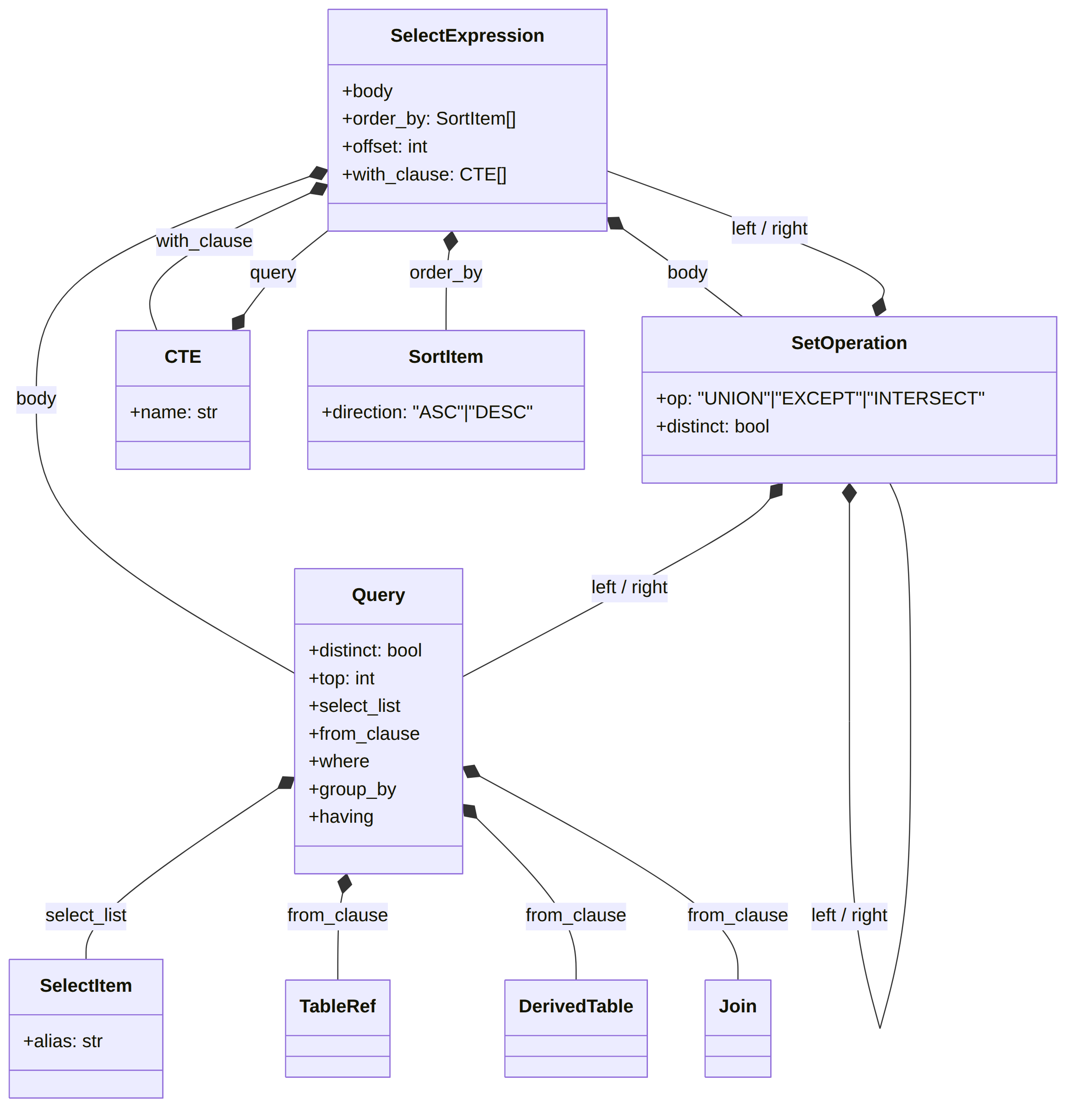
Table sources (FROM)
Predicates (WHERE / HAVING / ON)
Values and literals

Functions and CAST
Geometry (the ADQL-specific part)

Circle.center / Box.center / one item of Polygon.vertices is either a
Coordinates pair (a raw ra, dec) or any other point-valued Expr (a
column, POINT(...), CENTROID(...), a UDF) -- an ADQL 2.1 addition.
Check isinstance(center, Coordinates) to tell the two forms apart.
3. Worked example
SELECT TOP 100 g.source_id, g.ra, g.dec,
       DISTANCE(POINT('ICRS', g.ra, g.dec), POINT('ICRS', 56.75, 24.12)) AS dist
FROM gaiadr3.gaia_source AS g
WHERE CONTAINS(POINT('ICRS', g.ra, g.dec), CIRCLE('ICRS', 56.75, 24.12, 0.5)) = 1
ORDER BY dist ASC
parse_adql(query) returns (comments added, not part of the real repr):
SelectExpression(
    body=Query(
        distinct=False,
        top=100,                                    # TOP 100
        select_list=[
            SelectItem(expr=ColumnRef(['g', 'source_id'])),
            SelectItem(expr=ColumnRef(['g', 'ra'])),
            SelectItem(expr=ColumnRef(['g', 'dec'])),
            SelectItem(
                expr=Distance(                       # DISTANCE(...) AS dist
                    args=[
                        Point(coordsys=StringLiteral('ICRS'),
                              ra=ColumnRef(['g', 'ra']), dec=ColumnRef(['g', 'dec'])),
                        Point(coordsys=StringLiteral('ICRS'),
                              ra=NumberLiteral(56.75), dec=NumberLiteral(24.12)),
                    ],
                    numeric_form=False,               # the two-Point overload, not the 4-number one
                ),
                alias='dist',
            ),
        ],
        from_clause=[
            TableRef(name='gaiadr3.gaia_source', alias='g'),
        ],
        where=BinaryOp(                              # "... = 1" wraps CONTAINS(...)
            op='=',
            left=Contains(
                geom1=Point(coordsys=StringLiteral('ICRS'),
                            ra=ColumnRef(['g', 'ra']), dec=ColumnRef(['g', 'dec'])),
                geom2=Circle(coordsys=StringLiteral('ICRS'),
                             center=Coordinates(ra=NumberLiteral(56.75), dec=NumberLiteral(24.12)),
                             radius=NumberLiteral(0.5)),
            ),
            right=NumberLiteral(1.0),
        ),
        group_by=None,
        having=None,
    ),
    order_by=[SortItem(expr=ColumnRef(['dist']), direction='ASC')],  # lives on SelectExpression, not Query
    offset=None,
    with_clause=None,
)
A few things worth noticing here, because they trip people up the first time:
distinORDER BY distis just aColumnRef(['dist'])-- pyadql does not resolve it back to theDistance(...)expression it's aliased from; that kind of alias resolution is up to your own code if you need it.CONTAINS(...) = 1is an ordinaryBinaryOp('=', ...)wrapping aContainsnode -- there is no special "contains predicate" node; ADQL itself definesCONTAINS/INTERSECTSas numeric functions (returning 0/1), compared like any other number.ORDER BYsits on the outerSelectExpression, not insideQuery-- see section 1.
4. Node reference table
| Node | ADQL construct | Key fields | Notes |
|---|---|---|---|
SelectExpression |
the whole query (root) | body, order_by, offset, with_clause |
returned by parse_adql(); also wraps every subquery |
CTE |
one WITH name AS (...) entry |
name, query |
ADQL 2.1 |
Query |
one SELECT ... FROM ... |
distinct, top, select_list, from_clause, where, group_by, having |
no order_by/offset here |
SetOperation |
UNION/EXCEPT/INTERSECT |
op, distinct, left, right |
|
Star |
SELECT * |
-- | |
SelectItem |
one SELECT-list entry | expr, alias |
|
SortItem |
one ORDER BY entry | expr, direction |
|
TableRef |
a plain table in FROM | name, alias, columns |
|
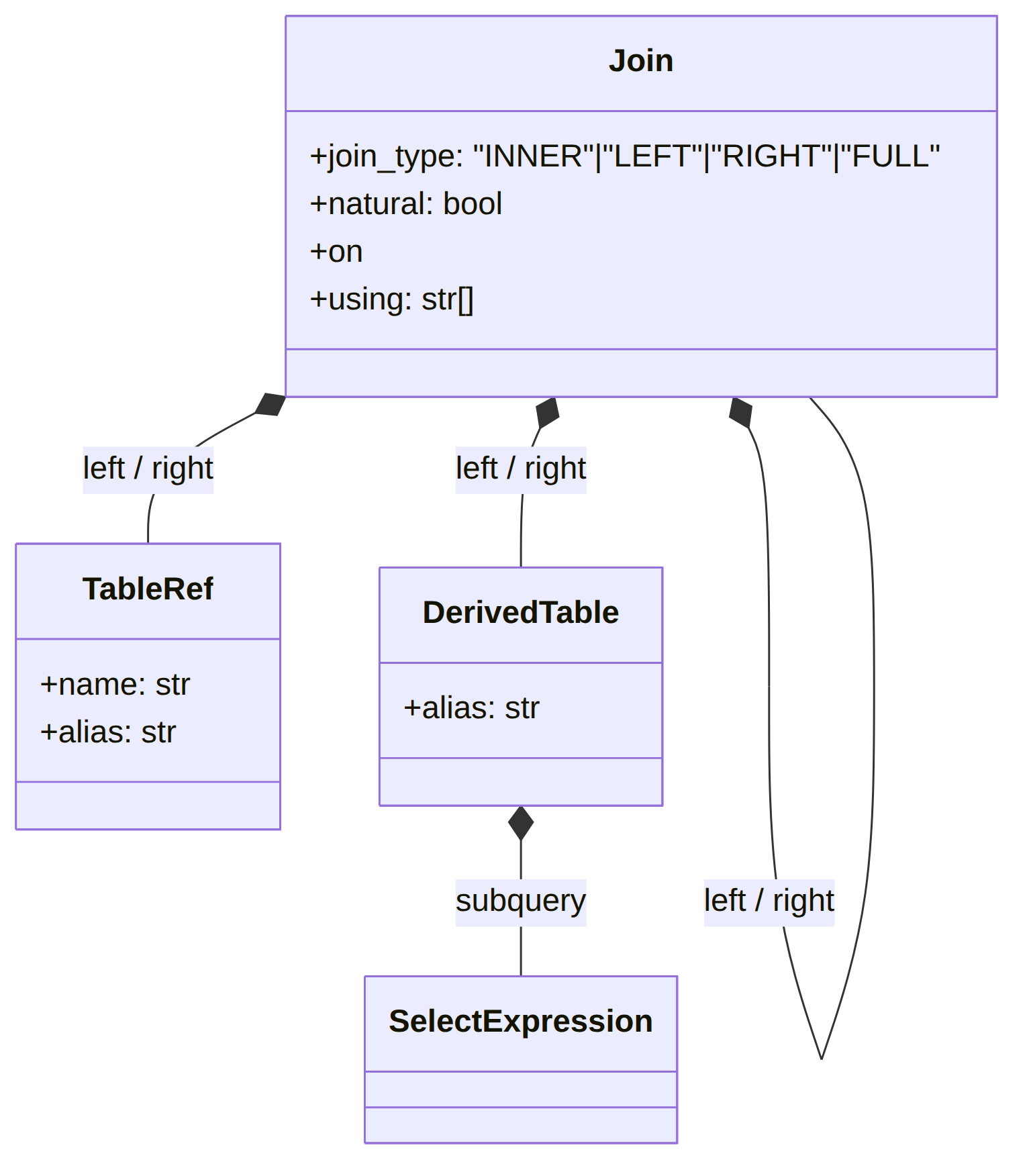
DerivedTable |
(SELECT ...) AS alias in FROM |
subquery, alias |
|
Join |
one JOIN | left, right, join_type, natural, on, using |
left-leaning tree for chained joins |
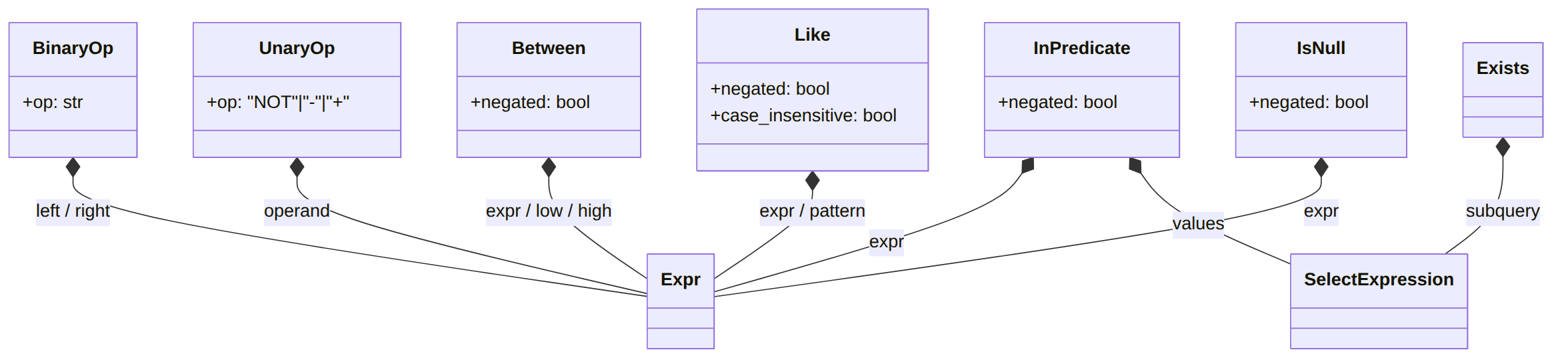
BinaryOp |
AND/OR/arithmetic/concat/comparisons | op, left, right |
one class, many operators |
UnaryOp |
NOT x / unary -x/+x |
op, operand |
|
Between |
BETWEEN |
expr, low, high, negated |
|
InPredicate |
IN (...) |
expr, values, negated |
values is a list or a SelectExpression |
Like |
LIKE/ILIKE |
expr, pattern, negated, case_insensitive |
|
IsNull |
IS [NOT] NULL |
expr, negated |
|
Exists |
EXISTS (...) |
subquery |
|
Contains |
CONTAINS(...) |
geom1, geom2 |
numeric predicate, usually wrapped in = 1 |
Intersects |
INTERSECTS(...) |
geom1, geom2 |
ditto |
ColumnRef |
a column, e.g. t.ra |
parts |
|
NumberLiteral / StringLiteral / NullLiteral / BoolLiteral |
literals | value |
|
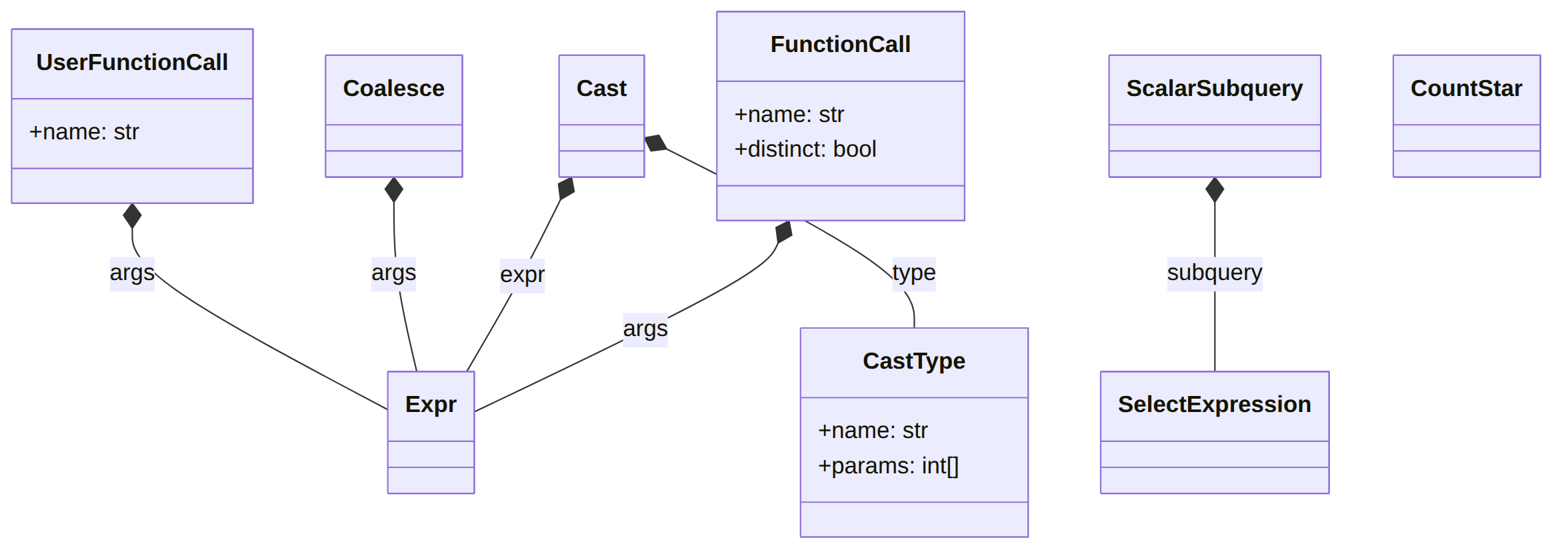
FunctionCall |
a recognized ADQL function call | name, args, distinct |
aggregates, numeric/trig, LOWER/UPPER |
CountStar |
COUNT(*) |
-- | |
Cast / CastType |
CAST(x AS type) |
expr, type / name, params |
ADQL 2.1 |
Coalesce |
COALESCE(...) |
args |
ADQL 2.1 |
UserFunctionCall |
any unrecognized name(...) |
name, args |
TAP-service UDFs |
ScalarSubquery |
(SELECT ...) used as a value |
subquery |
|
Point / Circle / Box / Polygon |
geometry constructors | coordsys, ... |
coordsys optional (ADQL 2.1) |
Coordinates |
a raw ra, dec pair |
ra, dec |
one form of a center/vertex |
Region |
REGION('stc-s') |
stcs |
plain str, not an Expr |
Centroid / Area / Coord1 / Coord2 / Coordsys |
geometry accessors | geom |
|
Distance |
DISTANCE(...) |
args, numeric_form |
two overloads, see docstring |
5. Walking the tree
There's no built-in visitor class (the AST is intentionally just plain dataclasses, no behavior), but a generic walker is a few lines since every node is a dataclass:
from dataclasses import fields, is_dataclass
from pyadql import parse_adql
from pyadql import ast_nodes as A

def walk(node, callback):
    """Call `callback(node)` for every AST node reachable from `node`."""
    if is_dataclass(node) and isinstance(node, A.Node):
        callback(node)
        for f in fields(node):
            walk(getattr(node, f.name), callback)
    elif isinstance(node, list):
        for item in node:
            walk(item, callback)

# Example: collect every column referenced anywhere in the query.
tree = parse_adql("SELECT ra FROM t WHERE dec > 0 AND CONTAINS(POINT('ICRS', ra, dec), c.footprint) = 1")
columns = []
walk(tree, lambda n: columns.append(str(n)) if isinstance(n, A.ColumnRef) else None)
print(columns)  # ['ra', 'dec', 'ra', 'dec', 'c.footprint']
Swap the isinstance check in the callback for whatever you're looking for
(A.FunctionCall to find function calls, A.TableRef to find referenced
tables, etc.) -- this is the same pattern used internally by
examples/basic_usage.py and by pyadql.cli.node_to_dict (which instead
serializes every node to a dict with a "_type" tag, for the --json CLI
output).